Native capture for Mac

Better screenshots.
Tighter videos.

Capture an area or window, then trim the slow parts, add the zooms you want, and export. TightTake stays in the menu bar until you need it.

Test TightTake

Join the TightTake beta.

Save your email, then open the current TestFlight build. Try real capture and editing workflows, then tell us where TightTake still needs tightening.

macOS 26Early buildsDirect feedback

Get the beta

Enter your email to save your place and reveal the TestFlight link.

See the editor
$4.99 launch priceOne-time purchase during the first month. $19.99 afterward.

Designed for macOS 26

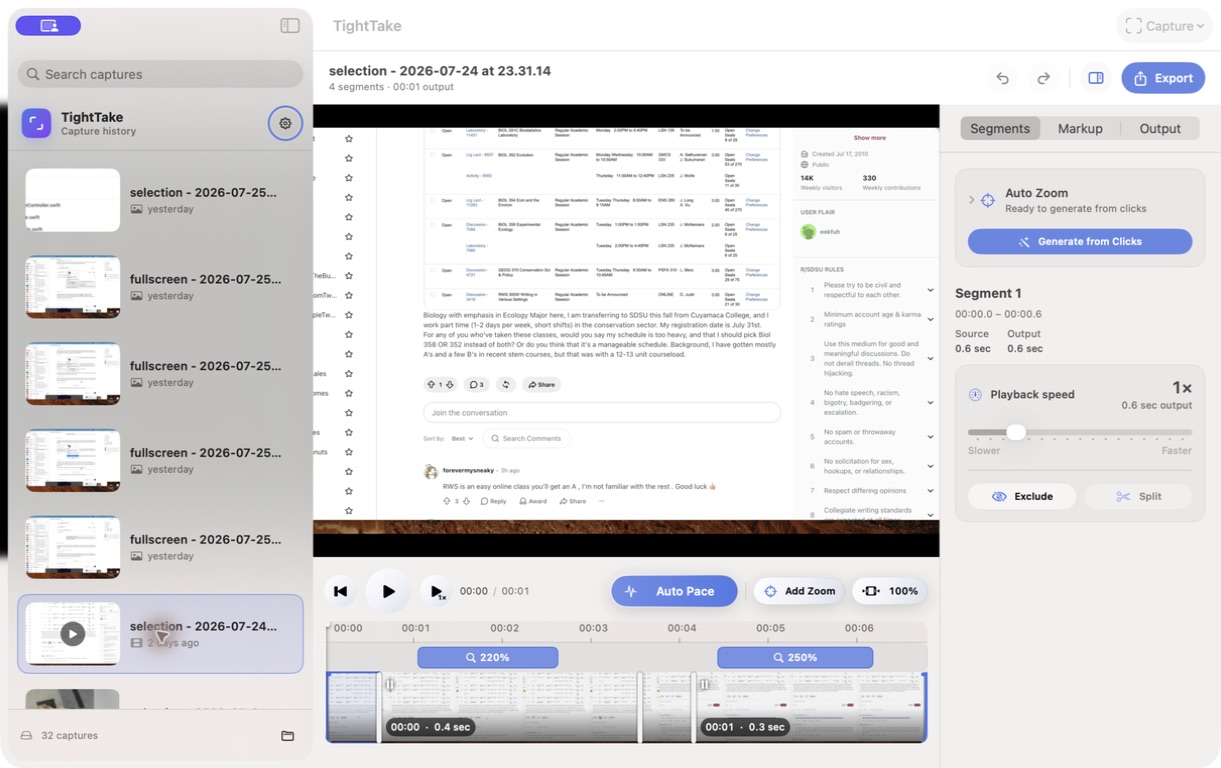
The current TightTake editor with distinct Auto Pace and Add Zoom controls, one zoom lane, and a segment inspector
Auto Pace
Zoom from clicks

Video editing

Speed up slow sections without adding zooms.

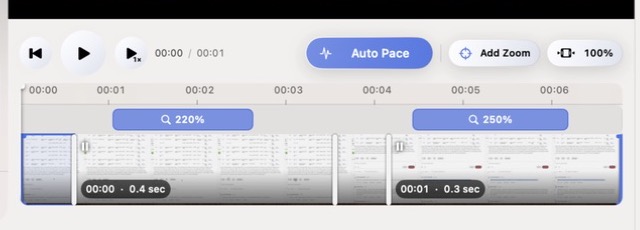
Auto Pace finds quiet stretches and speeds them up. It does not add zooms. Add one yourself—or generate them from recorded clicks—then drag each zoom exactly where it belongs.

  • Change Auto Pace sensitivity without rebuilding the video
  • Edit every zoom's position, length, and amount
  • Reset the timeline when you want a clean start
The current TightTake video editor showing separate Auto Pace and Add Zoom controls, editable zoom ranges, and video segments on the timeline
The current editorAuto Pace and zoom stay separate

Still images and video

Markup for screenshots. Timeline editing for video.

Mark up screenshots. Trim, speed up, and zoom video. Hide the inspector when you want more room, then export when the edit is finished.

Draw, highlight, shape, and label
Place zoom targets in the preview
Hide the inspector for more room
Export photos and videos

Local by default

Your files stay your files.

Captures are saved to the folder you choose. Open media from anywhere without copying it into TightTake's capture folder or adding it to capture history.

Local filesYour folderNo forced imports
Read the Privacy Policy

TightTake for Mac

Coming soon for macOS 26.

Screenshot, record, edit, and export from one native Mac app.

Launch special: $4.99Buy during the first month for a one-time $4.99. The price will then be $19.99.
TightTake for Mac is coming soon.
macOS 26 · Download coming soon